Showing posts with label Fonts. Show all posts

Friday, August 14, 2020

Trace and Teach - educational font

I will be releasing an educational tracing font with starting positions and stroke arrows for kindergarten, beginners, teachers, workbooks, etc. SOON! (I know, often my "soon" turns out to be months or years or never. :P Please be patient.)

However, these fonts will not be free. I plan to release them as commercial fonts. I have been developing these of-and-on since 2003 and they have been a lot of work. Since creating these have been time and labor intensive, I want some return on investment. These fonts will be for sale.

Baybayin Modern Teacher fonts are TrueType fonts that assists young learners in printing Baybayin and Surat Mangyan letter shapes correctly and efficiently.  It provides lines containing dotted letters for students to trace with the starting position and stroke directions illustrated for each letter, and punctuation mark.  The fonts have been carefully developed to provide an intuitive, practical introduction to writing Baybayin and Surat Mangyan.

The fonts uses extended stroke direction arrows to discourage students from lifting their pencils between strokes unnecessarily so that students do not form disjointed letters. Learning correct stroke sequences improves penmanship and encourages students to get used to the cursive and wavy strokes of Baybayin.

Many students never learn correct penmanship because stroke sequences are seldom emphasized in the classroom during formative years. Then in later grades it is very difficult for teachers to correct poor writing habits that are already well encoded into students' procedural memory. Get it right the first time around with Baybayin Modern Teacher fonts!

Besides learning correct stroke sequences, teachers will find that the standardized, uniform, and simpler letter shapes of these fonts to be practical and easier for the students to learn. The typeface is a cleaner and simpler version of the Doctrina Christiana typeface. As always, I added of the set of alternative glyphs from my modern set and proposed reform. I added the modern RA and the kawi based JA, Mangyan pamudpod, x-kudlit, anusvāra, visarga, e/o kudlits, pallawa & padalaw-a marks, and other syllable-doubling marks; assigning them to the appropriate keys.

Baybayin Modern Teacher fonts works like other custom fonts. After you buy the font, you download the font file, and install it on your Mac or PC. Then you use whatever software (like Microsoft Word, Microsoft PowerPoint or other software like Interactive White Board (IWB) software) to create resources for your class, like tracing sheets or flash cards.

Examples:

https://drive.google.com/file/d/1fF1idxzcdkZIdMrmEhvKMYVvnIM9y0r6/view?usp=sharing


Thursday, October 02, 2014

Old RA is the New RA

3 fonts updated w/ RA and minor clean up.
Mangyan Fonts Update:

I have been meaning to upload the updated Mangyan fonts with the new RA character. So here it is: DOWNLOAD (.zip file containing 3 .ttf files)

Last year the Mangyan people's leaders opted to reintroduce the older Hanunuo RA letter-form based on the LA character (with a minor modification on the rightmost up & down end strokes). They retired Antoon Postma's dash RA that was based on the Buhid variant of Surat Mangyan. New publications from the Mangyan Heritage Center (MHC) www.mangyan.org started to include the updated character earlier this year, starting with the Surat Mangyan Primer.

I'll update the individual .zip files in each of the font's DeviantArt download hosting later since I still need to update the keyboarding charts for them.

The Postma dash RA and its vowel modifiers (kudlit) are still included in the fonts. Accessed by typing the Uppercase R, 7, and 8 keys. The new RA and its kudlit are now currently set to the lowercase r, (, and ) keys.

A custom keyboard layout for Mangyan script is in the works for Windows 8 and Mac OSX. I just need to optimize the Hanunuo Unicode font and finish up a Buhid font/typeface that will share some of its Unicode range with Hanunuo for similar kudlit positions. The keyboard layout will probably be ready before the end of this year.

I'm also working on a Surat Mangyan children's coloring book for the MHC.

Updated Chart for the Mangyan Postma Font.

...

If you're looking for another Unicode compliant font,  Google's Noto Sans have both Hanunuo and Buhid here:

https://www.google.com/get/noto/#sans-hano
https://www.google.com/get/noto/#sans-buhd

...

Saturday, May 18, 2013

Connect the Dots...

Another New Font:


Download this font set from: http://nordenx.deviantart.com/art/Baybayin-Tulsok-Font-372428448

Another small/pixel font with no Unicode characters. You can still use this online in graphics, embedded trough a style-sheet (css), or via applications created in flash, etc.

Friday, May 10, 2013

Fancy Angles

Newly released fonts:


I didn't populate the Unicode range on these latest sets for two reasons:
  1. I don't have a dev PC anymore; I'm working through an old MacBook that doesn't have the expensive and more powerful professional/commercial font development software. I'm using freebie apps.
  2. These fancy fonts are not suited for online chat or post anyway (hard to read and too small). They are more suited for graphic work. Leaving the unicode range empty also avoids conflicts with other baybayin font files.

Monday, April 22, 2013

Little League

Tiny & Small Fonts (Sans Unicode)

For over two years now, I have not been able to edit fonts on a PC. My desktop has been dead for a while and the loaner laptop I have has been down as well. In the mean time, I have been using an old MacBook that was gifted to me. However, I am still unable to afford the purchase of a commercial & professional font creation suite. So, I have been limited to using less powerful & free softwares. Here is a couple of small font styles I created with these scaled down apps:


Download this font set from: http://nordenx.deviantart.com/art/Baybayin-Modern-Varsitita-Font-367508037


Download this font set from: http://nordenx.deviantart.com/art/Baybayin-Modern-Varsitito-Font-367336867


Download this font set from: http://nordenx.deviantart.com/art/Baybayin-Modern-Bolats-Font-367336085

These fonts are good for graphic-design & word-processing use only. They don't have Baybayin Unicode ranges filled up; but it's not really much of a big deal as they are too small to be used online anyway. They also don't carry my usual trademark "Tamaraw" glyph.

...

Friday, April 27, 2012

Using Baybayin Fonts

Read & Write Baybayin First:

Baybáyin is NOT an Alphabet.
Baybáyin is NOT Alibata.
Baybáyin is an Abugida.

To avoid embarrassing typographical errors, it is really important to learn how to actually read & write Baybayin Script and know the rules of both Abugida & Filipino orthography (spelling and pronunciation) first.

Visit these pages:

How to write using Baybayin Script: English Instructions <-click & visit
How to write using Baybayin Script: Filipino Instructions <-click & visit
These are thorough tutorials by Paul Morrow on how to write using Baybayin script in the original Filipino and modified Spanish methods. These tutorials are the most reliable and concise instructions online.

How do I write my name in baybayin? <-click & visit
This is the most frequently asked question regarding the script. This page offers strategies for writing difficult non-Filipino words and names in the baybayin script.

"A mistake people often make is to assume that the baybayin is just a neat looking alphabet; all you have to do is learn how draw the letters and then spell out the words in the language of your choice, and substitute each modern letter with a baybayin letter. However, baybayin doesn't work like that. This is the difference between an alphabet and a syllabic writing system." ~ Paul Morrow 

SOURCE: Sarisari etc. - http://www.mts.net/~pmorrow/


Typing with Baybayin Fonts:

"Easy Keyboard Access" this is one of the main benefit of Baybayin FONTS; for convenient usage and typing in word processing & graphic editing softwares.

Most Common Mistake - Vowel Characters & Kudlit marks treated as an Alphabet:
Multiple instances of vowel characters and little to no kudlit marks are the usual tell-tale giveaway.


Source: http://felipeaira.i.ph/blogs/felipeaira/2008/10/11/matanglawin/


"Easy Keyboard Access" does NOT mean "go ahead and type anything and it will be correct".

When using either Paul Morrow Fonts or Nordenx Fonts, the capital letter keys (shift+) A, E, I, O, and U will type Vowel Characters (ᜀ, ᜁ, ᜂ). Each of these characters represent a stand-alone vowel SYLLABLE not just an alphabet or letter with a vowel sound.

Each Baybayin Consonant Characters are also singular SYLLABLES that already has a default /a/ vowel sound. A kudlit mark is added to the character to change the /a/ vowel sound to the other vowel sounds /e/, /i/, /o/, or /u/. This is done by typing the lower-case vowel letter keys (e, i, o, or u) after the consonant character. The kudlit mark (dot, slash, caret, or chevron, etc.) should appear above or below the character after you typed the lower-case vowel.

A virama mark (x-kudlit or pamudpud) is added to the character to cancel the inherent or default /a/ vowel sound to create a vowel-less consonant character (dead-consonant). The x-kudlit (a modern replacement for the krus-kudlit introduced in the Doctrina Christiana) is recommended for leading or stand-alone dead-consonants, the pamudpud (a virama used by the Mangyan tribes of Mindoro) for trailing dead-consonants.

The Keys to Baybayin Fonts:

When you know the rules and know how to read & write in Baybayin script, install one or a few Baybayin fonts in your computer then familiarize yourself where and in which keyboard key is each character or glyph assigned to (you can use this tool - click here). Typing Baybayin in wordprocessing or graphic editing softwares should be straightforward by then.

The Key to Baybayin Online:

Using Baybayin characters online like typing your status on facebook or in a chat client is a different story. Online, Baybayin fonts requires using the Unicode range which is normally not easily accessed by your regular keyboard. The Unicode range can only be accessed using a specialized program like an online tool/application of by changing your keyboard's settings.

Learn: "How to type Baybayin using Unicode." <- click here & visit


ᜀ Type uppercase 'A' = syllable character "A" (traditional) 
- Type lowercase 'a' = none * 
ᜁ Type uppercase 'I' = syllable character "I" (traditional) 
 Type lowercase 'i' = kudlit mark "i" (traditional) 
ᜂ Type uppercase 'U' = syllable character "U" (traditional) 
 Type lowercase 'u' = kudlit mark "u" (traditional) 

Type '=' or '+' for a krus or x kidlit virama (reformed)

ᜅ Type uppercase 'N' = syllable character "NGA" (traditional)
ᜈ Type lowercase 'n' = syllable character "NA" (traditional) 

ᜊ Type 'b' or 'B' = syllable character "BA" or "VA" (traditional)
ᜃ Type 'c', 'k', 'K' = syllable character "KA" or "CA" (traditional)
ᜇ Type 'd' or 'D' = syllable character "DA" or "RA" (traditional)
ᜄ Type 'g' or 'G' = syllable character "GA" (traditional)
ᜑ Type 'h' or 'H' = syllable character "HA" (traditional)
ᜎ Type 'l' or 'L' = syllable character "LA" or "RA" (traditional)
ᜋ Type 'm' or 'M' = syllable character "MA" (traditional)
ᜉ Type 'f' or 'F' = syllable character "PA" or "FA" (traditional)
ᜐ Type 's' or 'S' = syllable character "SA" (traditional)
ᜆ Type 't' or 'T' = syllable character "TA" (traditional)
ᜏ Type 'w' or 'W' = syllable character "WA" (traditional)
ᜌ Type 'y' or 'Y' = syllable character "YA" (traditional)

ᜍ Type 'r' or 'R' = syllable character "RA" (modern alternative)
ᜉ Type 'p' or 'P' = syllable character "PA" or "YA" (archaic)
ᜊ Type 'v' or 'V' = syllable character "VA" (alternative)
ᜐ Type 'z' or 'Z' = syllable character "ZA" (alternative)

ᜁ Type uppercase 'E' = syllable character "E" (alternative)
 Type lowercase 'e' = kudlit mark "e" (modern alternative)
ᜂ Type uppercase 'O' = syllable character "O" (alternative)
Type lowercase 'o' = kudlit mark "o" (modern alternative)

ᜐ Type 'C' = character combo "TSA" for 'cha' (reformed)*
ᜃ Type 'q' = character combo "KUWA" for 'qua' (traditional)
ᜃ Type 'Q' = character combo "KWA" for 'qua' (reformed)
ᜇ Type 'j' = character combo "DIYA" for 'ja' (traditional)
ᜇ Type 'J' = character combo "DYA" for 'ja' (reformed)
ᜃ Type 'x' or 'X' = character combo "KSA" for 'xa' (reformed)
ᜈ Type '~' = character combo "NYA" for 'ña' (reformed)

 * may differ or not be available (yet) in some fonts.

Mind What You Type:


Common Mistake - mixing methods: 
There are several modes of writing Baybayin, don't mix them together in one composition. Don't confuse your readers.

Common Mistake - not translating to a Filipino language or forcing foreign pronunciation & spelling:
Ideally, Babayin should be used primarily for Philippine languages. However, Baybayin has been known to be used by natives to write some Spanish and English (in "Pilipinized" spelling) words.  

Rules of thumb:
  • Use borrowed words sparingly and only if there are no available equivalent words for them in any Philippine language or even Spanish. If you have to use the word as it is, you should follow the official rules on how to Pilipinize the spelling & pronunciation of foreign or borrowed words and how to break-it-down into syllables as laid out by the  Philippine National Language Commission in the Balarila (Rules of Orthography).
  • If the word is an important scientific or technical term and you do not have a direct and official translation to any Philippine language or Spanish - don't Pilipinize the spelling and don't write it in Baybayin Script, use the Latin Alphabet instead.
  • If the word is a name of person (or organization) - don't Pilipinize the spelling and don't write it in Baybayin Script, use the Latin Alphabet instead - unless that person (or group) made known to you or the public how they write his/her name in Baybayin (or they personally requested you to do so); how one prefers their name spelled & pronounced is a personal issue.
Common Mistake - tackling acronyms & initials:

-> CLICK HERE <- for more info about using Baybayin Script in Acronyms & Initialism.

...
Enhanced by Zemanta

Saturday, July 16, 2011

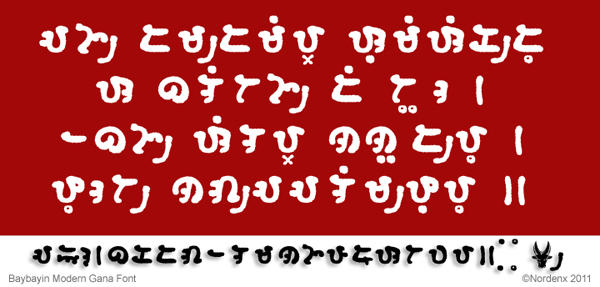
Ganado


Download this font from: http://nordenx.deviantart.com/art/Baybayin-Modern-Gana-Font-225516266

I finally finished uploading all updated Baybayin Modern Fonts this month and released several new fonts along with the it.

For a list of all the fonts, click here: "FONT DOWNLOAD PAGE"

Included in all my fonts are alternative glyphs/characters that you can use if you prefer to.
  1. ᜍ = ra: may be the only character modification I introduce. Its shape is carefully designed and based on D, P, R letter shapes and ᜇᜎᜉᜁ character shapes, strokes & qualities as well as the Bikolano, Mangyan, other Malay, and other Asian ra characters.
  2. x = virama [Spanish cross kudlit (+)]: rendered by the = equal and + plus keys, it cancels vowels, preferably for leading or stand-alone consonant sounds;
    ex. ᜊ᜔ᜍᜓ bro | ᜅ᜔ ng
  3. / = pamudpod (Mangyan's virama): rendered by the / forward-slash key, it cancels vowels, preferably for trailing or dead-consonat sounds;
    ex. ᜊᜍ/ bar | ᜈᜅ/ nang
  4. ● = solid kudlit marks can be used as traditional kudlits, I use them for high vowels i and u kudlit.
  5. o = hollow kudlit marks are alternatives that I use for the mid vowels e and o.
The other alternate characters (not modified, just a different style of the same type/character):
  1. O = ᜊ can still be pronounced as ba but can be used to signify va.
  2. vz = ᜐ can still be pronounced as sa but can be used to signify za.
  3. I and U characters has more complex strokes than E and O but are essentially still the same I/E and O/U characters.
  4. Uppercase Q renders the character combination ᜃ᜔ᜏ k'wa.
  5. Lowercase q renders the character combination ᜃᜓᜏ kuwa.
  6. Uppercase J renders the character combination ᜇ᜔ᜌ d'ya.
  7. Lowercase j renders the character combination ᜇᜒᜌ diya.
  8. Both X and x renders the character combination ᜃ᜔ᜐ k'sa. eg. ᜁᜃ᜔ᜐᜋ/ = exam
  9. Some font sets have ᜆ᜔ᜐ t'sa or cha assigned to uppercase C.
  10. Updated in all fonts, the A character ᜀ can now only be accessed by the uppercase A like the other vowel characters I, E, O, and U.
  11. You can use ᜉ fa as the traditional pa.
  12. My fonts use an old loop-ended version of pa that some of you may mistake as the old loop-ended ya. You may substitute them if you're looking for a traditional look.
  13. My ᜌ ya is a more modern open ended (non-loop-ended) glyph.
The updates reassigned several glyphs to different keys, standardized & cleaned several character strokes, and fixed compatibility clashing issues.
    Enhanced by Zemanta

    Saturday, July 03, 2010

    Surat Mangyan Brush Font

    New Mangyan Font:

    Download this new font set from: http://nordenx.deviantart.com/art/Mangyan-Hanunoo-Brush-Font-169880405


    Updated Mangyan Font:

    Download the updated file from: http://nordenx.deviantart.com/art/Mangyan-Hanunoo-Font-149145096

    Font updated to v.1.50
    • Unicode ranges transferred from Tagalog to Hanunóo
    • Finished welding and verifying all glyphs
    • Various cleanup and re-alignments


    A Brush with Fate (Baybayin Sighting)
    During my quick and short visit to my home province of Mindoro last year (May, 2009), I spotted this poster on a wall inside a restaurant in Calapan City.

    I don't know who the artist/writer was but I am quite intrigued with his/her use of Hanunoo script. I am not sure if this poster actually is written in the Mangyan language; I can read the script alright, but it only seem like gibberish to me. It does not seem to be written in Tagalog and I don't fully understand Mangyan so I can't truly be sure what it says.

    Anyway, it's been a year since and I am going back to the Philippines this July 9, 2010 and will be staying until Aug. 28, 2010. I plan to visit the Mangyan Heritage Center in Calapan City sometime during my stay there. Maybe I can ask someone over there to translate this poster to me.

    Anyway, this poster is one of the inspirations for the new brush-style font. I was also looking at other examples of Hanunóo handwriting (not carving).

    What's new?
    Like the previous Hanunóo font, I included the pamudpod as well as the cross kudlit or virama. To access the pamudpod use the equal key ( = ) and to access the virama use the plus key ( + ).

    There is a new kudlit system?
    The Nordenx fonts are created so that a standard western keyboard can easily access the baybayin characters. However, please note that the Mangyan script have different kudlit positions depending on what character is used. These different kudlit positions can be accessed by typing the keys for e, i, o, u, 1, 2, 3, 4, 5, and 6 (see sample image in the download page). Using these keys, you can easily and accurately position your kudlits to write the proper Mangyan syllables. To render kudlit in the classical baybayin i/e & o/u locations, just use the i an o keys respectively.

    Hanunóo script is used in writing ambāhan - I think it's time to learn how to write these epic poems.


    ...

    Tuesday, June 08, 2010

    Download Free Modern Baybayin Fonts

    Download Free Baybayin Modern Fonts

    PLEASE GO TO THE DOWNLOAD PAGE FOR A MORE UPDATED LIST.

    Download Free Baybayin Modern Fonts

    Note: even though the style of these fonts are modern, you can still use it to write in the traditional way.

    The updated font files are hosted in deviantART. If you download them from any other font-collective websites, keep in mind that they may not be the most up-to-date version of the file.

    In the deviantART page for each font, look for the download link in either the text description or the download arrow button located at the upper-right side of the page.


    FAQ: How to install these fonts on your computer? Click Here for Answer

    All of Nordenx Baybayin Modern Fonts are for personal and non-commercial use only. Please contact me at nordenx@yahoo.com for any inquiries about commercial use in publications or electronic applications.

    To try-out any of these fonts before you download them, use this typepad: Baybayin Fonts Typepad

    Previews & Download Locations of available fonts:


    Download this font set from: http://nordenx.deviantart.com/art/Baybayin-Modern-Bern-Font-253861545


    Download this font set from: http://nordenx.deviantart.com/art/Baybayin-Modern-Tanso-Font-241218356


    Download this font set from: http://nordenx.deviantart.com/art/Baybayin-Modern-Alemania-Font-241209530


    Download this font set from: http://nordenx.deviantart.com/art/Baybayin-Modern-Alphabeta-Font-241191137


    Download this font set from: http://nordenx.deviantart.com/art/Baybayin-Modern-Club-Font-231829356


    Download this font set from: http://nordenx.deviantart.com/art/Baybayin-Modern-Ringo-Font-221118715


    Download this font set from: http://nordenx.deviantart.com/art/Baybayin-Modern-Jepoy-Font-231576002


    Download this font set from: http://nordenx.deviantart.com/art/Baybayin-Modern-Gana-Font-225516266


    Download this font set from: http://nordenx.deviantart.com/art/Baybayin-Modern-Kana-Font-184288362


    Download this font set from: http://nordenx.deviantart.com/art/Baybayin-Modern-Damo-Font-184637586


    Download this font set from: http://nordenx.deviantart.com/art/Baybayin-Modern-Sinta-Font-150968942


    Download this font set from: http://nordenx.deviantart.com/art/Baybayin-Modern-Mono-Font-150969288


    Download this font set from: http://nordenx.deviantart.com/art/Baybayin-Modern-Mindoro-Font-149015455


    Download this font set from: http://nordenx.deviantart.com/art/Batbayin-Modern-Brush-Font-148846227


    Download this font set from: http://nordenx.deviantart.com/art/Baybayin-Modern-Divine-Font-148108328


    Download this font set from: http://nordenx.deviantart.com/art/Baybayin-Modern-Sulat-Font-147024184


    Download this font set from: http://www.deviantart.com/deviation/40485497/


    Download this font set from: http://www.deviantart.com/deviation/40485871/


    Download this font set from: http://www.deviantart.com/deviation/40485989/


    Download this font set from: http://www.deviantart.com/deviation/40486111/


    Download this font set from: http://www.deviantart.com/deviation/58810506/

    --------------

    Mangyan Fonts:

    Download this font set from: http://nordenx.deviantart.com/art/Mangyan-Hanunoo-Postma-Font-252407086


    Download this new font set from: http://nordenx.deviantart.com/art/Mangyan-Hanunoo-Brush-Font-169880405


    Download this font set from: http://nordenx.deviantart.com/art/Mangyan-Hanunoo-Font-149145096

    --------------

    Kapampangan Fonts:


    Download this font set from: http://nordenx.deviantart.com/art/Baybayin-Pamagkulit-Font-246309064

    Watch this video tutorial on "How to type Kapampangan script (Kulitan) vertically in Microsoft Word using the Pamagkulit Font inside a table." Please watch it in Full Screen Mode to see the details:


    --------------

    ~How to install these fonts on your computer:


    The fonts are in compressed (.zip files). The latest Operating Systems (OS) are now able to open these in their own folders when you click on the file. If your computer is older and unable to open these files, then you will need a utility such as WinZip or WinRar to uncompress them. Download a free evaluation version of WinZip or WinRar.

    Each zip file contains the true type font file (.ttf) and a text file (.rtf) that contains aditional info about the font and its use & features; please read it.

    You can extract (uncompress) the font file directly to your C:\WINDOWS\Fonts folder if you want or you can extract it to a temporary folder then follow the font installation instructions can be found at MyFonts.com or from Paul Morrow's Site.

    For Windows 7 / Vista users:
    • Right-click the font file(s) and choose Install.
    For users of the previous Windows versions:
    • Copy the included file(s) into a default Windows font folder (usually C:\WINDOWS\FONTS or C:\WINNT\FONTS)
    For Mac:
    • Expand any compressed fonts packages.
    • Double-click the icon of the font file you want to install. The Font Book will open and display the font so you can preview it.
    • By default, the application installs the font in the Library folder of your home directory, making it available only to you. To make it available to all users on the computer, from the Font Book menu, select Preferences... , and then change the "Default Install Location:" from User to Computer.


    • Click Install Font.

    A Note On Baybayin Styles and Names
    Although there are many forms of the baybayin, it must be remembered that they are not unique to the languages that share their names. That is to say, the baybayin, like our modern alphabet, can be written or printed in many ways and each style can be used to write in any language. Just as italic printing is not only for Italian, a so-called Tagalog baybayin is not just for Tagalog or a supposed Ilokano script only for Ilokano etc.
    The baybayin is a single writing system. The confusion between the forms of the baybayin and various Filipino languages may be due to historical circumstances or just sloppy reporting on the part of some historians. For example, the typeface chosen by Father Francisco Lopez in 1620 to print the Ilokano version of the Doctrina Christiana looks different to the one used in the Tagalog version of 1593 but they are both just two styles of the one baybayin. However, the Lopez typeface has since come to be mistaken in some circles as the “Ilokano alphabet” simply because it was used most notably in an Ilokano book.
    Other forms of the baybayin such as Bikol and Bisaya have similar histories. Their origins can be traced only as far back as certain modern printed documents of the Spanish era that were written in their respective languages – their particular styles originating in the artistry of the authors. – PAUL MORROW


    --------------