Showing posts with label Unicode. Show all posts

Sunday, June 03, 2012

Surat Mangyan UPDATE

Big update for Surat Mangyan fonts!

First off, a brand new font:
  • Buhid Script v.1.0

Download set from: http://Nordenx.deviantart.com/art/Mangyan-Buhid-Font-306046314

Next, major updates for existing Mangyan fonts:

Hanunuo Fonts UPDATED to v.2.00
* New kudlit position for Wu assigned to the 9 key
* New keystroke for Di assigned to Ae
* New kudlits assigned & extended to Buhid Unicode range
* Various internal file info & settings cleaned up
* New pakudos symbol assigned to the # key

Download set from: http://nordenx.deviantart.com/art/Mangyan-Hanunoo-Postma-Font-252407086


Download set from: http://nordenx.deviantart.com/art/Mangyan-Hanunoo-Brush-Font-169880405


Download set from: http://nordenx.deviantart.com/art/Mangyan-Hanunoo-Font-149145096


What's up with kudlits being assigned & extended to the Buhid Unicode range?

When the original proposal to assign blocks of Unicode ranges was sent out to the Unicode Consortium, the people responsible did not ask for 28 more reserved spaces (14 for Buhid, 14 for Hanunuo) that should've covered the 14 unique kudlit positions required by different characters per both Buhid & Hanunuo scripts. Once the ranges were locked in, it has now become next to impossible to request or make drastic changes in the Unicode block.

Working around this limitation, I have devised a Unicode range redistribution plan for all Nordenx Baybayin fonts. -> DOCUMENTATION <-

The first test of this redistribution is underway via a new Surat Mangyan Unicode Typepad:


Please, test drive it and see what you think. :)

...
Enhanced by Zemanta

Saturday, May 12, 2012

Baybayin Unicode Keyboard Layout for Mac OSX

Your standard "Keyboard Layout" settings can be changed in order to access international language or special characters assigned to Unicode ranges within particular fonts. Most of these Unicode blocks/range contain the characters that you can not normally just type directly nor with a combination of specialized "short-cut" keystrokes or commands.

There are two groups or blocks of characters in Baybayin fonts:
1) Easily accessible characters on a standard western keyboard layout. - they replace the usual Alphabet letters (Basic Latin Characters) so your normal keyboard layout can select & type Baybayin script characters as soon as you install the font in your computer. With this, the font can be used in any word processing or graphic editing software.
2) Characters assigned to their appropriate Unicode range - you need special apps/tools like an online typepad to access these characters or you can also change your keyboard layout to be able to directly type or use Baybayin online. With this, typing Baybayin characters can be viewed by anyone online as long as they have a Unicode compliant Baybayin font and their computer & browser are setup to view Unicode. However, Unicode is not without its own problems: http://unicode.org/help/display_problems.html
Characters of Baybayin Fonts as accessed on a Standard Keyboard Layout:
Changing your Standard Keyboard Layout to a Unicode Keyboard Layout:

A couple of years ago, JC John Sese Cuneta (JC) and the Ubuntu Philippines LoCo Team started development of the Philippine National Keyboard Layout. They created a standardized layout for Baybayin (Unicode).

Visit this site: techmagus.icu to learn how to download and install the Baybayin Keyboard Layout that matches the type of keyboard and operating system available on your machine.
  • The Official Philippine National Keyboard Layout for Linux and Windows: click here
  •  Modern Baybayin Unicode Keyboard Layout for Mac OS X bundle: DOWNLOAD
  •  Modern Baybayin Unicode Keyboard Layout for Windows 8 and 10: click here
To install the Baybayin Keyboard Layout for Mac OSX, download and save the baybayin.bundle folder and all its containing files to "/Library/Keyboard Layouts". That is a folder called “Keyboard Layouts” in the "Library" folder at the top level of your startup disk or home folder. You can create the folder if it doesn’t already exist. You need to restart your Mac after saving the file for the keyboard layout to activate.

Note: You must have at least one Unicode compatible Baybayin font installed in your machine for this layout to work properly. If you only see square boxes, download and install a font from -> here <-.


To enable and use a keyboard layout is a two-step process. The first step is accomplished in the System Preferences program:

 In the System Preferences, click on the International Preferences or the Language & Text icon under the Personal group.

In the Language & Text pane, you need to click on the Input Sources or Input Menu tab (at least on 10.4 and 10.5).
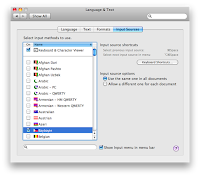
In the list that is in the "pane" (what Mac calls a "panel" or window), you should be able to find the keyboard layout that you have installed, in this case it is called Baybayin (it should have a Philippine flag icon).

Once you have found your keyboard layout, you need to ensure that the check box in the first column is checked, which will not be the case when the keyboard layout is first installed. Also ensure that “Show input menu in menu bar” at the bottom of the window is checked.


The second step is to enable the keyboard from the Input menu.
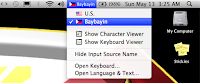
The Input menu is on the right of the menu bar, and usually has a flag there, corresponding to the current input source (keyboard layout or input method). If the Input menu is not shown, it has to be enabled in International Preferences described above. You then can activate your keyboard layout by selecting it from the menu.
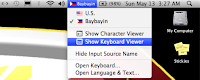
 

Once installed, you can easily switch between your default keyboard layout and the Baybayin keyboard layout any time from the Input menu.
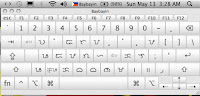


You can even view or check what characters are assigned in each key by opening the Show Keyboard Viewer from the Input menu.


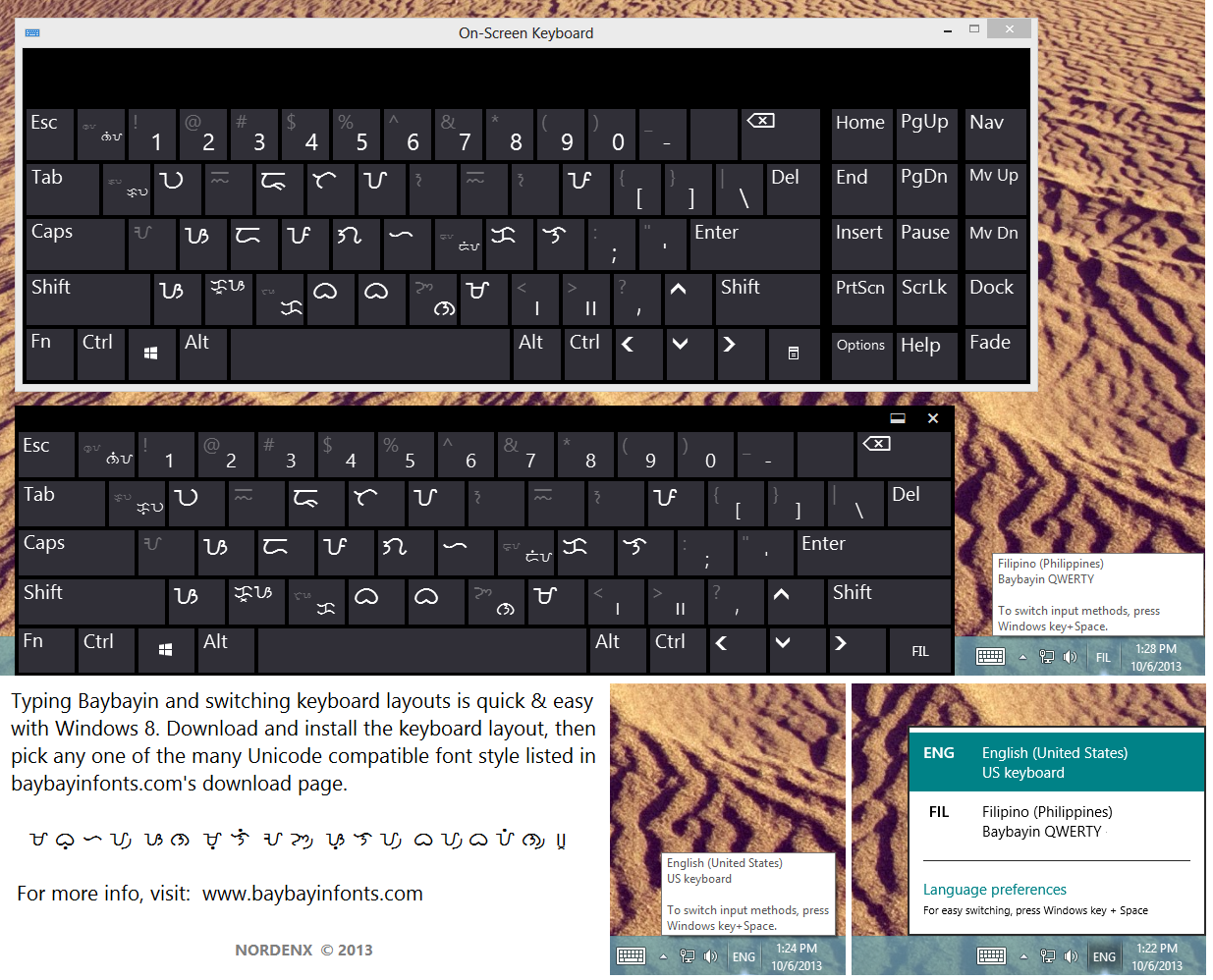
The Unicode characters in the Baybayin Keyboard Layout v.1.00 is shown in the images below:


 Alternate Option:
A Tagalog Keyboard Layout for Mac OS X was developed by Alex Ibrado a couple of years back. Alex's Unicode layout diverted significantly from the normal font characters assigned to the default keyboard layout; it felt disconnected. Alex erroneously also included the RA character in the Unicode range U+172D which is the Hanunuo RA in my Mangyan fonts; all my Baybayin fonts just like Paul Morrow other people's fonts, use U+170D for ᜍ RA. This is why I developed this new Baybayin Keyboard Layout to match the standard keyboard's flow when using the normal "non-unicode" characters in the fonts. *edit: Alex has since updated his layout.

You can try out Alex Ibrado's setup too. -> click here <- and visit his site.

Caveat Lector:
Keep in mind that Mac's Safari browser has problems displaying Baybayin font's kudlit marks properly. The best web browser for typing & viewing Baybayin Unicode is Firefox.

As for softwares, Baybayin fonts (both normal & Unicode range) works well in Microsoft Office (Word, PowerPoint, etc.), Notepad, and Adobe Suite (Photoshop, Illustrator, etc.); the Mac version for these products are fine. Unfortunately it isn't the same for other Mac products; it is even glitches in TextEdit! :(


...

Try Windows 8:


http://nordenx.blogspot.com/2013/10/baybayin-keyboard-layout-for-windows-8.html

Saturday, September 10, 2011

Unicode Converter Update

UPDATE:  

Outdated tech, Adobe Flash no longer functions.  

 
Now it is even easier to type in Baybayin Unicode and copy/paste it to Facebook!
Non-baybayin-reading folks can now translate what others wrote in Baybayin Unicode!

Use the Baybayin Unicode Converter today! :)

ᜇᜓᜋᜍᜋᜒ ᜈ ᜀᜅ᜴ ᜄᜓᜋᜄᜋᜒᜆ᜴ ᜅ᜔ ᜊᜌ᜴ᜊᜌᜒᜈ᜴ ᜐ ᜉᜒᜌ᜔ᜐ᜴ᜊᜓᜃ᜴᜶ ᜇᜑᜒᜎ᜴ ᜇᜒᜆᜓ᜵ ᜇᜓᜋᜍᜋᜒ ᜈ ᜍᜒᜈ᜴ ᜀᜅ᜴ ᜎᜓᜋᜎᜉᜒᜆ᜴ ᜐ ᜀᜃᜒᜈ᜴ ᜈ ᜀᜅ᜴ ᜑᜒᜎᜒᜅ᜴ ᜀᜌ᜴ ᜀᜌᜓᜐᜒᜈ᜴ ᜃᜓ ᜇᜏ᜴ ᜁᜆᜓᜅ᜴ ᜀᜉ᜴ᜎᜒᜃᜐ᜴ᜌᜓᜈ᜴ ᜈ ᜁᜆᜓ ᜉᜍ ᜁᜆᜓᜌ᜔ ᜋᜀᜀᜍᜒᜅ᜴ ᜋᜃᜊᜐ ᜇᜒᜈ᜴ ᜅ᜔ ᜂᜈᜒᜃᜓᜇ᜴᜶

The Baybayin Unicode Converter (Typepad) has been updated:

  • If you see boxes above instead of Baybayin characters - Download the updated Baybayin Modern Font (BMF) Unicode Mono - Updated: Sept. 10, 2011
    If you have downloaded this font before this update, please re-download & update your .ttf file.
  • The font's glyphs have been updated for better legibility, strokes adjusted and the x virama made larger.
  • It can now convert Baybayin Unicode into text. To convert Baybayin Unicode to text, select the "READ Baybayin Unicode" tool option on the drop-down menu, copy then paste the characters you wish to convert onto the text area, then click the "conv" (convert) button.
  • There are two new typing modes; the x Mode automatically types a virama below each character making them stand alone consonants, while the a Mode types syllable characters with the default 'a' vowel sound. Depending on which mode you use, typing vowels or kudlit marks after each character alters the default 'a' or cancels an auto-typed virama.
  • There is a ·· check-box that allows double kudlit marks which repeats a same-vowel syllable. It is automatically unchecked after each double kudlit is typed.
  •  A new "copy" (to clipboard) button is added to the "TYPE Baybayin Unicode" tool option to make it quick & easy to do so, it automatically highlights and copies everything you typed.
  • The Surat Mangyan pamudpod mark Unicode range is made accessible so you can use it if you chose to follow the following proposed modern virama rules:
  1. x = virama [Spanish cross kudlit (+)]: rendered by the = equal and + plus keys, it cancels vowels, preferably for leading or stand-alone consonant sounds;
    ex. ᜊ᜔ᜍᜓ bro | ᜅ᜔ ng
  2. / = pamudpod (Mangyan's virama): rendered by the / forward-slash key, it cancels vowels, preferably for trailing or dead-consonat sounds;
    ex. ᜊᜍ᜴ bar | ᜈᜅ᜴ nang
Enjoy! :)
Enhanced by Zemanta

Tuesday, June 29, 2010

Baybayin Unicode Converter

UPDATE:  

Outdated tech, Adobe Flash no longer functions. 


So you saw your Filipino friends using Baybayin (a.k.a. Alibata to the uninformed) characters on Facebook and you wondered how they do that, right? Well, if you're not that tech savvy - here is the secret: it's called Unicode.

This typepad application converts typed text to the Baybayin Unicode character equivalent and vice versa.

If the application below doesn't load, try this link: Baybayin Unicode Converter Typepad Page


BMF UNICODE MONO FONT IS REQUIRED BY THIS APPLICATION TO DISPLAY THE GLYPHS CORRECTLY: 

TIPS & USES:
  • To type Baybayin Unicode, select the "TYPE Baybayin Unicode" option from the drop-down menu on the top-left of the app.
  • There are 2 Typing modes; the x Mode automatically types a virama below each character making them stand alone consonants, while the a Mode types syllable characters with the default 'a' vowel sound. Depending on which mode you use, typing vowels or kudlit marks after each character alters the default 'a' or cancels an auto-typed virama.
  • The ·· check-box allows double kudlit marks that repeats a same-vowel syllable. It is automatically unchecked after each double kudlit is typed.
  • After typing in Baybayin Unicode characters, you can highlight your characters and copy (simply click on the ⇩ copy button) then paste & post the glyphs in Facebook or forums or anywhere else on the web for that matter.
  • Anyone with a web browser that is set up to view UTF8 and have a Unicode compliant font installed in their computer that has Baybayin characters in the appropriate range (Tagalog range: U+1700–U+171F), would be able to see the Baybayin characters you posted.
  • To configure your browser to view Unicode: http://www.lib.uchicago.edu/e/su/mideast/encyclopedia/browsers.html
  • To convert Baybayin Unicode to text, select the "READ Baybayin Unicode" option on the drop-down menu, copy then paste the characters you wish to convert onto the text area, then click the "conv" button.
  • You can scroll up or down on the text area using your mouse wheel.
  • To learn more about how to write in baybayin, please visit this - list of pertinent Baybayin links.
  • Unicode compliant Baybayin Fonts:
    Morrow's Fonts - Sarisari etc...
    Baybayin Modern Fonts -
    Download Page

Limitations:
  • Type using your keyboard at a normal speed, not too quick as network lag can slow down processing and will end up skipping characters.
  • The app only converts every text character typed the end of the word/sentence, letters inserted in between other characters will not be converted.

Warning! This is not a translator application. Do not rely on this tool for correct spelling and transliteration. This is a free-form learning tool. Unless you're already proficient with Filipino languages and Baybayin script, transcribing is best left to professionals.
Enhanced by Zemanta
4ebc-97b9-e16803717c05" style="border: medium none; float: right;" />

Sunday, February 07, 2010

To do list - Tagalog Unicode and Welding Fonts

On Alibata & Baybayin updates:

I have many new Baybayin and "Alibata" fonts in the works. BTW, I am using the term "alibata" now to categorize baybayin fonts that are not styled after native Asian and Indic scripts; this will include Arabic Kufic & Western styled fonts and fonts that include expanded consonantal characters like those seen on Bayani Mendoza De Leon's manual (See example @ Christian Cabuay's site). Bear in mind that other than my stylized "Da" for "Ra" and open/closed kudlit or proposed markers, I will not add other new characters deemed unnecessary to my fonts (this means that I wont be making very many "alibata style" fonts). Artistically stylized characters like fantasy, techno, floral, or horror fonts will remain categorized as modern baybayin as long as the character or glyph shapes are not based specifically on western typefaces and do not have "expanded" characters. This means that BMF Block, even though uses Blackletter style is still categorized under "baybayin style" since the character shapes are in essence retains the traditional forms.

My immediate "to-do" tasks:

Welding Duty...
I found out, while developing the Baybayin Typepad app, that glyphs or parts of them that are not welded or joined together in will actually show any overlapping parts if you set the font antialiasing above normal range. My immediate goal before I released any more fonts is to fix these characters in all my released fonts and update all of the download packages. (This is what I get for my laziness) I apologize for my sloppy mistake, after updating the individual zip files I will also package all the updated set into one zip file bundle so that you don't have to download most of them one by one.

Who Ra?
Another thing I just noticed is that the Wikipedia entry, which uses unicode to display baybayin script, is actually using the reserved Tagalog Unicode address $170D to display "Ra" ("Da" really, duh!) - this is news to me since the current unicode chart for Tagalog still doesn't have a "Ra" and $170D is still on reserve. I failed to notice the Wikipedia use of $170D until my recent hard drive crash, when I revisited the site without the most basic baybayin fonts (Quivira & Morrow) and it showed the 170D marker for all the "Ra" entries on the examples. Nevertheless, as you can see on the image above, I have begun integrating my "Ra" character onto the $170D address on all my fonts. This will be part of my next font update release.
Enhanced by Zemanta