Sunday, June 03, 2012

Surat Mangyan UPDATE

Big update for Surat Mangyan fonts!

First off, a brand new font:
  • Buhid Script v.1.0

Download set from: http://Nordenx.deviantart.com/art/Mangyan-Buhid-Font-306046314

Next, major updates for existing Mangyan fonts:

Hanunuo Fonts UPDATED to v.2.00
* New kudlit position for Wu assigned to the 9 key
* New keystroke for Di assigned to Ae
* New kudlits assigned & extended to Buhid Unicode range
* Various internal file info & settings cleaned up
* New pakudos symbol assigned to the # key

Download set from: http://nordenx.deviantart.com/art/Mangyan-Hanunoo-Postma-Font-252407086


Download set from: http://nordenx.deviantart.com/art/Mangyan-Hanunoo-Brush-Font-169880405


Download set from: http://nordenx.deviantart.com/art/Mangyan-Hanunoo-Font-149145096


What's up with kudlits being assigned & extended to the Buhid Unicode range?

When the original proposal to assign blocks of Unicode ranges was sent out to the Unicode Consortium, the people responsible did not ask for 28 more reserved spaces (14 for Buhid, 14 for Hanunuo) that should've covered the 14 unique kudlit positions required by different characters per both Buhid & Hanunuo scripts. Once the ranges were locked in, it has now become next to impossible to request or make drastic changes in the Unicode block.

Working around this limitation, I have devised a Unicode range redistribution plan for all Nordenx Baybayin fonts. -> DOCUMENTATION <-

The first test of this redistribution is underway via a new Surat Mangyan Unicode Typepad:


Please, test drive it and see what you think. :)

...
Enhanced by Zemanta

Saturday, May 12, 2012

Baybayin Unicode Keyboard Layout for Mac OSX

Your standard "Keyboard Layout" settings can be changed in order to access international language or special characters assigned to Unicode ranges within particular fonts. Most of these Unicode blocks/range contain the characters that you can not normally just type directly nor with a combination of specialized "short-cut" keystrokes or commands.

There are two groups or blocks of characters in Baybayin fonts:
1) Easily accessible characters on a standard western keyboard layout. - they replace the usual Alphabet letters (Basic Latin Characters) so your normal keyboard layout can select & type Baybayin script characters as soon as you install the font in your computer. With this, the font can be used in any word processing or graphic editing software.
2) Characters assigned to their appropriate Unicode range - you need special apps/tools like an online typepad to access these characters or you can also change your keyboard layout to be able to directly type or use Baybayin online. With this, typing Baybayin characters can be viewed by anyone online as long as they have a Unicode compliant Baybayin font and their computer & browser are setup to view Unicode. However, Unicode is not without its own problems: http://unicode.org/help/display_problems.html
Characters of Baybayin Fonts as accessed on a Standard Keyboard Layout:
Changing your Standard Keyboard Layout to a Unicode Keyboard Layout:

A couple of years ago, JC John Sese Cuneta (JC) and the Ubuntu Philippines LoCo Team started development of the Philippine National Keyboard Layout. They created a standardized layout for Baybayin (Unicode).

Visit this site: techmagus.icu to learn how to download and install the Baybayin Keyboard Layout that matches the type of keyboard and operating system available on your machine.
  • The Official Philippine National Keyboard Layout for Linux and Windows: click here
  •  Modern Baybayin Unicode Keyboard Layout for Mac OS X bundle: DOWNLOAD
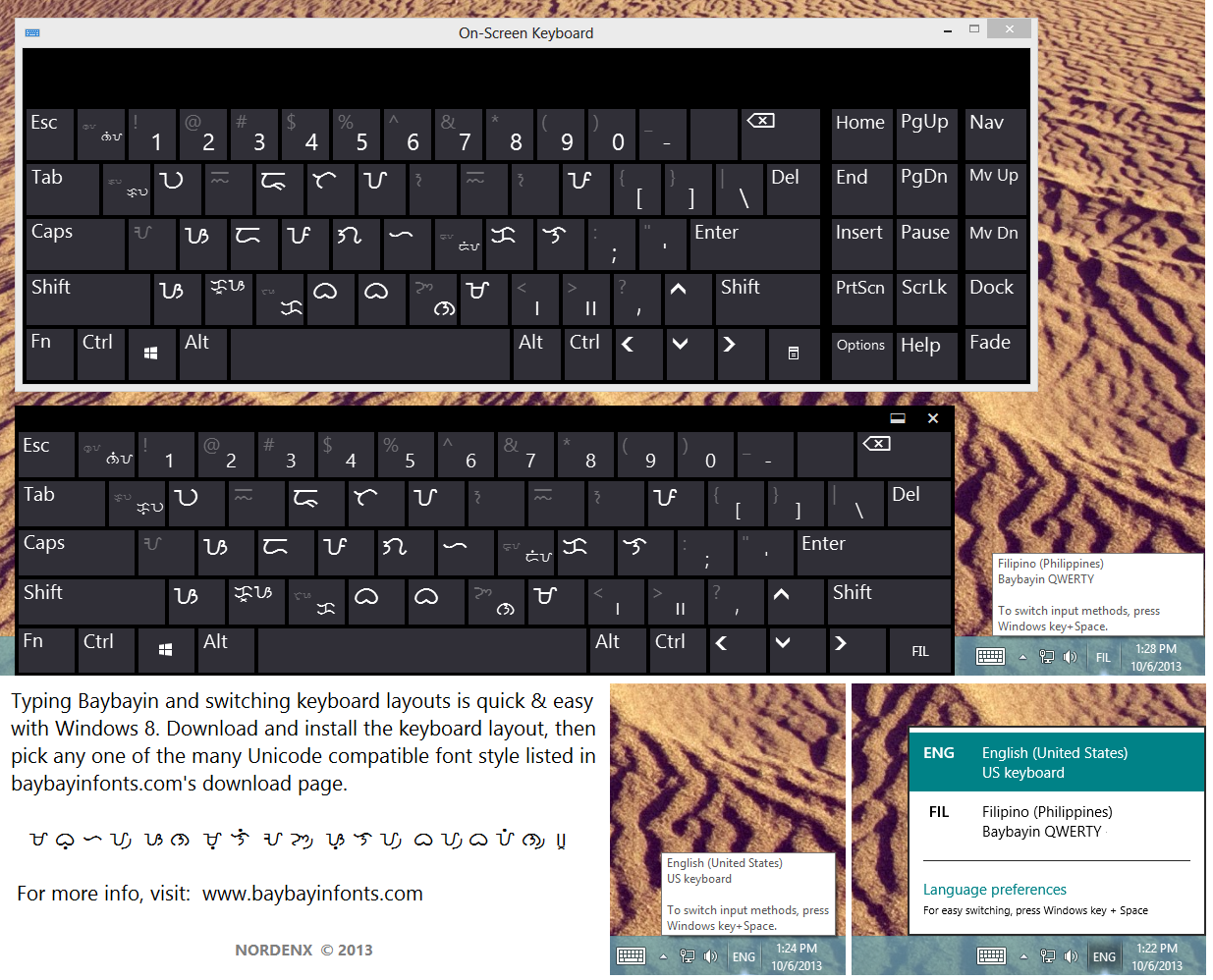
  •  Modern Baybayin Unicode Keyboard Layout for Windows 8 and 10: click here
To install the Baybayin Keyboard Layout for Mac OSX, download and save the baybayin.bundle folder and all its containing files to "/Library/Keyboard Layouts". That is a folder called “Keyboard Layouts” in the "Library" folder at the top level of your startup disk or home folder. You can create the folder if it doesn’t already exist. You need to restart your Mac after saving the file for the keyboard layout to activate.

Note: You must have at least one Unicode compatible Baybayin font installed in your machine for this layout to work properly. If you only see square boxes, download and install a font from -> here <-.


To enable and use a keyboard layout is a two-step process. The first step is accomplished in the System Preferences program:

 In the System Preferences, click on the International Preferences or the Language & Text icon under the Personal group.

In the Language & Text pane, you need to click on the Input Sources or Input Menu tab (at least on 10.4 and 10.5).

In the list that is in the "pane" (what Mac calls a "panel" or window), you should be able to find the keyboard layout that you have installed, in this case it is called Baybayin (it should have a Philippine flag icon).

Once you have found your keyboard layout, you need to ensure that the check box in the first column is checked, which will not be the case when the keyboard layout is first installed. Also ensure that “Show input menu in menu bar” at the bottom of the window is checked.


The second step is to enable the keyboard from the Input menu.

The Input menu is on the right of the menu bar, and usually has a flag there, corresponding to the current input source (keyboard layout or input method). If the Input menu is not shown, it has to be enabled in International Preferences described above. You then can activate your keyboard layout by selecting it from the menu.
 

Once installed, you can easily switch between your default keyboard layout and the Baybayin keyboard layout any time from the Input menu.


You can even view or check what characters are assigned in each key by opening the Show Keyboard Viewer from the Input menu.


The Unicode characters in the Baybayin Keyboard Layout v.1.00 is shown in the images below:


 Alternate Option:
A Tagalog Keyboard Layout for Mac OS X was developed by Alex Ibrado a couple of years back. Alex's Unicode layout diverted significantly from the normal font characters assigned to the default keyboard layout; it felt disconnected. Alex erroneously also included the RA character in the Unicode range U+172D which is the Hanunuo RA in my Mangyan fonts; all my Baybayin fonts just like Paul Morrow other people's fonts, use U+170D for RA. This is why I developed this new Baybayin Keyboard Layout to match the standard keyboard's flow when using the normal "non-unicode" characters in the fonts. *edit: Alex has since updated his layout.

You can try out Alex Ibrado's setup too. -> click here <- and visit his site.

Caveat Lector:
Keep in mind that Mac's Safari browser has problems displaying Baybayin font's kudlit marks properly. The best web browser for typing & viewing Baybayin Unicode is Firefox.

As for softwares, Baybayin fonts (both normal & Unicode range) works well in Microsoft Office (Word, PowerPoint, etc.), Notepad, and Adobe Suite (Photoshop, Illustrator, etc.); the Mac version for these products are fine. Unfortunately it isn't the same for other Mac products; it is even glitches in TextEdit! :(


...

Try Windows 8:


http://nordenx.blogspot.com/2013/10/baybayin-keyboard-layout-for-windows-8.html

Wednesday, May 02, 2012

Baybayin Acronyms & Initials

An "Acronym" is the term widely used to describe any abbreviation formed from initial letters and in some cases initial syllables. Most dictionaries define acronym to mean "a word" in its original sense, while other dictionaries attributes other senses that make an acronym to have the same meaning as that of initialism.

According to the first definition found in most dictionaries, examples of acronyms are NATO (/ˈneɪtoʊ/), scuba (/ˈskuːbə/), and radar (/ˈreɪdɑr/), while examples of initialisms are FBI (/ˌɛfˌbiːˈaɪ/) and HTML (/ˌeɪtʃˌtiːˌɛmˈɛl/). - source wiki

Initialisms are pronounced letter by letter using the alphabet character's names. Acronyms are read and treated as words.

Since Baybayin is an Abugida and each of its characters are phonetic syllables, Filipino acronyms and initialisms should be written in Baybayin script as they are pronounced by native Filipinos in their native tongue.

Since "acronyms are read and treated as words" and a lot of acronyms are "names" of organizations and technical terminology, we then go back to the "rules of thumb" which are:
  • If the word is an important scientific or technical term and you do not have a direct and official translation to any Philippine language or Spanish - don't Pilipinize the spelling and don't write it in Baybayin Script, use the Latin Alphabet instead.
  • If the word is a name of person (or organization) - don't Pilipinize the spelling and don't write it in Baybayin Script, use the Latin Alphabet instead - unless if that person (or group) made known to you or the public how they write his/her name in Baybayin (or they personally requested you to do so); how one prefers their name spelled & pronounced is a personal issue.
ISSUES...
One may argue that the acronym for "Unibersidad ng Pilipinas", UP (/ʊpɪ/) should have been written as ᜂᜉᜒ (characters U and PA with an i-kudlit) which is read as "upi" and not as ᜂᜉ (just U and PA) which is read as "upa", a word that means "rent", as shown in their graduation sash.

However, UP already officially established for several years now that they like to write their acronym/initialism not as ᜂᜉᜒ "upi" nor ᜌᜓᜉᜒ "yupi" but as ᜂᜉ "upa" - we owe it to them to stand by their "choice" and we should respect their decision.

Source: http://www.ovcrd.upd.edu.ph/blog/2010/03/09/up-sablay/

"The indigenous letters ᜂ (U) and ᜉ (PA), originating from the indigenous alphabet called baybayin or katitikan, are equivalent to the Roman letters “U” and “P”, respectively."
Note: They used the term - indigenous "alphabet" to describe Baybayin letters, and wanted to use them as "equivalent to Roman letters". A clue?

Baybayin is NOT an Alphabet.
It is not possible that they were unaware that Baybayin was already described in detail in numerous publications from earlier on as a "syllabary" and later an "abugida" or "alpha-syllabary". Each Baybayin letter or character represents a phonetic syllable, NOT an alphabetic phoneme. Baybayin covers the phonetic syllable range of the native language but not every phoneme of the Latin Alphabet; unless you count my proposed modifications,  letters J, Ñ, R, C, Q, E, O, F, Z, and X have no "equivalent" letters in traditional baybayin.  But as a center and authority for higher learning, this possible failure to recognize the well established details about Baybayin does not sit well with many researchers and practitioners in the Baybayin support community.

A fix?
There is nothing we can do with the UPa issue at the moment, only they can resolve that.

Meanwhile, a couple of Baybayin enthusiasts have suggested to either use a virama or make up a new mark that has the function of changing a baybayin character to its equivalent alphabet letter name.

As far as using a virama; we must bear in mind that if you cancel the inherent /a/ vowel of a Baybayin (Abugida) character, you end up with a consonant 'sound' particle not a consonant letter name. A ᜋ᜔ ('MA' with a virama) or ᜋ᜴ ('MA' with a pamudpud) is not an 'M' pronounced as /ɛm/, it is a /m/ sound. Such is the assigned function of a virama mark.

So with that in mind, why not make up a new mark and instead of calling it a virama, call it something like maybe a "tari" mark, right? The new mark they introduced looks like a mix of an x-virama & a pamudpod. This new mark is assigned the function of changing a Baybayin character to its equivalent Alphabet letter name. It seems like a good idea, but it is a long way from being linguistically or officially recognized or standardized & approved.

Alternatively, I am inclined to reintroduce an old suggestion to frame proper names, acronyms, and initials in bracket marks like the
「 」 Japanese Quotation Marks. Ex. 「ᜂ᜵ᜉ」 (U.P.)

However, none of these "fixes" can render initials with the Latin Alphabets (C, Q, E, O, F, Z, and X) as they don't have direct Baybayin equivalents.


For now, it's best we just follow the "rules of thumb" (mentioned above).


...
Enhanced by Zemanta

Friday, April 27, 2012

Using Baybayin Fonts

Read & Write Baybayin First:

Baybáyin is NOT an Alphabet.
Baybáyin is NOT Alibata.
Baybáyin is an Abugida.

To avoid embarrassing typographical errors, it is really important to learn how to actually read & write Baybayin Script and know the rules of both Abugida & Filipino orthography (spelling and pronunciation) first.

Visit these pages:

How to write using Baybayin Script: English Instructions <-click & visit
How to write using Baybayin Script: Filipino Instructions <-click & visit
These are thorough tutorials by Paul Morrow on how to write using Baybayin script in the original Filipino and modified Spanish methods. These tutorials are the most reliable and concise instructions online.

How do I write my name in baybayin? <-click & visit
This is the most frequently asked question regarding the script. This page offers strategies for writing difficult non-Filipino words and names in the baybayin script.

"A mistake people often make is to assume that the baybayin is just a neat looking alphabet; all you have to do is learn how draw the letters and then spell out the words in the language of your choice, and substitute each modern letter with a baybayin letter. However, baybayin doesn't work like that. This is the difference between an alphabet and a syllabic writing system." ~ Paul Morrow 

SOURCE: Sarisari etc. - http://www.mts.net/~pmorrow/


Typing with Baybayin Fonts:

"Easy Keyboard Access" this is one of the main benefit of Baybayin FONTS; for convenient usage and typing in word processing & graphic editing softwares.

Most Common Mistake - Vowel Characters & Kudlit marks treated as an Alphabet:
Multiple instances of vowel characters and little to no kudlit marks are the usual tell-tale giveaway.


Source: http://felipeaira.i.ph/blogs/felipeaira/2008/10/11/matanglawin/


"Easy Keyboard Access" does NOT mean "go ahead and type anything and it will be correct".

When using either Paul Morrow Fonts or Nordenx Fonts, the capital letter keys (shift+) A, E, I, O, and U will type Vowel Characters (ᜀ, ᜁ, ᜂ). Each of these characters represent a stand-alone vowel SYLLABLE not just an alphabet or letter with a vowel sound.

Each Baybayin Consonant Characters are also singular SYLLABLES that already has a default /a/ vowel sound. A kudlit mark is added to the character to change the /a/ vowel sound to the other vowel sounds /e/, /i/, /o/, or /u/. This is done by typing the lower-case vowel letter keys (e, i, o, or u) after the consonant character. The kudlit mark (dot, slash, caret, or chevron, etc.) should appear above or below the character after you typed the lower-case vowel.

A virama mark (x-kudlit or pamudpud) is added to the character to cancel the inherent or default /a/ vowel sound to create a vowel-less consonant character (dead-consonant). The x-kudlit (a modern replacement for the krus-kudlit introduced in the Doctrina Christiana) is recommended for leading or stand-alone dead-consonants, the pamudpud (a virama used by the Mangyan tribes of Mindoro) for trailing dead-consonants.

The Keys to Baybayin Fonts:

When you know the rules and know how to read & write in Baybayin script, install one or a few Baybayin fonts in your computer then familiarize yourself where and in which keyboard key is each character or glyph assigned to (you can use this tool - click here). Typing Baybayin in wordprocessing or graphic editing softwares should be straightforward by then.

The Key to Baybayin Online:

Using Baybayin characters online like typing your status on facebook or in a chat client is a different story. Online, Baybayin fonts requires using the Unicode range which is normally not easily accessed by your regular keyboard. The Unicode range can only be accessed using a specialized program like an online tool/application of by changing your keyboard's settings.

Learn: "How to type Baybayin using Unicode." <- click here & visit


ᜀ Type uppercase 'A' = syllable character "A" (traditional) 
- Type lowercase 'a' = none * 
ᜁ Type uppercase 'I' = syllable character "I" (traditional) 
 Type lowercase 'i' = kudlit mark "i" (traditional) 
ᜂ Type uppercase 'U' = syllable character "U" (traditional) 
 Type lowercase 'u' = kudlit mark "u" (traditional) 

Type '=' or '+' for a krus or x kidlit virama (reformed)

ᜅ Type uppercase 'N' = syllable character "NGA" (traditional)
ᜈ Type lowercase 'n' = syllable character "NA" (traditional) 

ᜊ Type 'b' or 'B' = syllable character "BA" or "VA" (traditional)
ᜃ Type 'c', 'k', 'K' = syllable character "KA" or "CA" (traditional)
ᜇ Type 'd' or 'D' = syllable character "DA" or "RA" (traditional)
ᜄ Type 'g' or 'G' = syllable character "GA" (traditional)
ᜑ Type 'h' or 'H' = syllable character "HA" (traditional)
ᜎ Type 'l' or 'L' = syllable character "LA" or "RA" (traditional)
ᜋ Type 'm' or 'M' = syllable character "MA" (traditional)
ᜉ Type 'f' or 'F' = syllable character "PA" or "FA" (traditional)
ᜐ Type 's' or 'S' = syllable character "SA" (traditional)
ᜆ Type 't' or 'T' = syllable character "TA" (traditional)
ᜏ Type 'w' or 'W' = syllable character "WA" (traditional)
ᜌ Type 'y' or 'Y' = syllable character "YA" (traditional)

ᜍ Type 'r' or 'R' = syllable character "RA" (modern alternative)
ᜉ Type 'p' or 'P' = syllable character "PA" or "YA" (archaic)
ᜊ Type 'v' or 'V' = syllable character "VA" (alternative)
ᜐ Type 'z' or 'Z' = syllable character "ZA" (alternative)

ᜁ Type uppercase 'E' = syllable character "E" (alternative)
 Type lowercase 'e' = kudlit mark "e" (modern alternative)
ᜂ Type uppercase 'O' = syllable character "O" (alternative)
Type lowercase 'o' = kudlit mark "o" (modern alternative)

ᜐ Type 'C' = character combo "TSA" for 'cha' (reformed)*
ᜃ Type 'q' = character combo "KUWA" for 'qua' (traditional)
ᜃ Type 'Q' = character combo "KWA" for 'qua' (reformed)
ᜇ Type 'j' = character combo "DIYA" for 'ja' (traditional)
ᜇ Type 'J' = character combo "DYA" for 'ja' (reformed)
ᜃ Type 'x' or 'X' = character combo "KSA" for 'xa' (reformed)
ᜈ Type '~' = character combo "NYA" for 'ña' (reformed)

 * may differ or not be available (yet) in some fonts.

Mind What You Type:


Common Mistake - mixing methods: 
There are several modes of writing Baybayin, don't mix them together in one composition. Don't confuse your readers.

Common Mistake - not translating to a Filipino language or forcing foreign pronunciation & spelling:
Ideally, Babayin should be used primarily for Philippine languages. However, Baybayin has been known to be used by natives to write some Spanish and English (in "Pilipinized" spelling) words.  

Rules of thumb:
  • Use borrowed words sparingly and only if there are no available equivalent words for them in any Philippine language or even Spanish. If you have to use the word as it is, you should follow the official rules on how to Pilipinize the spelling & pronunciation of foreign or borrowed words and how to break-it-down into syllables as laid out by the  Philippine National Language Commission in the Balarila (Rules of Orthography).
  • If the word is an important scientific or technical term and you do not have a direct and official translation to any Philippine language or Spanish - don't Pilipinize the spelling and don't write it in Baybayin Script, use the Latin Alphabet instead.
  • If the word is a name of person (or organization) - don't Pilipinize the spelling and don't write it in Baybayin Script, use the Latin Alphabet instead - unless that person (or group) made known to you or the public how they write his/her name in Baybayin (or they personally requested you to do so); how one prefers their name spelled & pronounced is a personal issue.
Common Mistake - tackling acronyms & initials:

-> CLICK HERE <- for more info about using Baybayin Script in Acronyms & Initialism.

...
Enhanced by Zemanta

Saturday, September 10, 2011

Unicode Converter Update

UPDATE:  

Outdated tech, Adobe Flash no longer functions.  

 
Now it is even easier to type in Baybayin Unicode and copy/paste it to Facebook!
Non-baybayin-reading folks can now translate what others wrote in Baybayin Unicode!

Use the Baybayin Unicode Converter today! :)

ᜇᜓᜋᜍᜋᜒ ᜈ ᜀᜅ᜴ ᜄᜓᜋᜄᜋᜒᜆ᜴ ᜅ᜔ ᜊᜌ᜴ᜊᜌᜒᜈ᜴ ᜐ ᜉᜒᜌ᜔ᜐ᜴ᜊᜓᜃ᜴᜶ ᜇᜑᜒᜎ᜴ ᜇᜒᜆᜓ᜵ ᜇᜓᜋᜍᜋᜒ ᜈ ᜍᜒᜈ᜴ ᜀᜅ᜴ ᜎᜓᜋᜎᜉᜒᜆ᜴ ᜐ ᜀᜃᜒᜈ᜴ ᜈ ᜀᜅ᜴ ᜑᜒᜎᜒᜅ᜴ ᜀᜌ᜴ ᜀᜌᜓᜐᜒᜈ᜴ ᜃᜓ ᜇᜏ᜴ ᜁᜆᜓᜅ᜴ ᜀᜉ᜴ᜎᜒᜃᜐ᜴ᜌᜓᜈ᜴ ᜈ ᜁᜆᜓ ᜉᜍ ᜁᜆᜓᜌ᜔ ᜋᜀᜀᜍᜒᜅ᜴ ᜋᜃᜊᜐ ᜇᜒᜈ᜴ ᜅ᜔ ᜂᜈᜒᜃᜓᜇ᜴᜶

The Baybayin Unicode Converter (Typepad) has been updated:

  • If you see boxes above instead of Baybayin characters - Download the updated Baybayin Modern Font (BMF) Unicode Mono - Updated: Sept. 10, 2011
    If you have downloaded this font before this update, please re-download & update your .ttf file.
  • The font's glyphs have been updated for better legibility, strokes adjusted and the x virama made larger.
  • It can now convert Baybayin Unicode into text. To convert Baybayin Unicode to text, select the "READ Baybayin Unicode" tool option on the drop-down menu, copy then paste the characters you wish to convert onto the text area, then click the "conv" (convert) button.
  • There are two new typing modes; the x Mode automatically types a virama below each character making them stand alone consonants, while the a Mode types syllable characters with the default 'a' vowel sound. Depending on which mode you use, typing vowels or kudlit marks after each character alters the default 'a' or cancels an auto-typed virama.
  • There is a ·· check-box that allows double kudlit marks which repeats a same-vowel syllable. It is automatically unchecked after each double kudlit is typed.
  •  A new "copy" (to clipboard) button is added to the "TYPE Baybayin Unicode" tool option to make it quick & easy to do so, it automatically highlights and copies everything you typed.
  • The Surat Mangyan pamudpod mark Unicode range is made accessible so you can use it if you chose to follow the following proposed modern virama rules:
  1. x = virama [Spanish cross kudlit (+)]: rendered by the = equal and + plus keys, it cancels vowels, preferably for leading or stand-alone consonant sounds;
    ex. ᜊ᜔ᜍᜓ bro | ᜅ᜔ ng
  2. / = pamudpod (Mangyan's virama): rendered by the / forward-slash key, it cancels vowels, preferably for trailing or dead-consonat sounds;
    ex. ᜊᜍ᜴ bar | ᜈᜅ᜴ nang
Enjoy! :)
Enhanced by Zemanta

Sunday, August 28, 2011

Kulitan Angulo Typepad

One of the main difference of Súlat Kapampángan from Baybayin is its vertical direction which the current Kulitan Script practitioners consider as the standard. The other unique feature is stacking characters and syllable grouping (instead of sequential characters in a word grouping). While beautiful in handwritten executions, it poses a few problems for modern typographers and font designers; just like the hurdles other developers face when designing Asiatic fonts. It requires a bit of advanced technical know-how and some special programs/apps to pull off. A level of difficulty that I have yet to master. And so, I experiment...

UPDATE:  

Outdated tech, Adobe Flash no longer functions. 


I am currently developing/designing the Kulitan Angulo Font used for the typepad above. The font is a horizontaly typed font with glyphs/characters tilted on its side, 90° counterclockwise. The typepad above is specially programed to automatically tilt or "change the angle" (hence the font name "Angulo") of the typing area so you can view (and be able to continue to type) in the traditional vertical manner intended for the script.
 

For Word-processing:


One can use the font in a word-processing program like Microsoft Word without any special setup; just type horizontally then after you print the document, all you have to do is turn the printed material 90° clockwise and the composition is vertically oriented as is normal with Kulitan.

However, you can also use the font to type vertically in Microsoft Word by using a table with a simple & easy setup:

  • Insert a single-cell borderless table and re-size it as close to the margins of the page as possible.
  • (in Word 2003 or earlier) Select the table, click Format on the top menu. Click "Text Direction" and choose the direction you want (Vertical).
  • (in Word 2007 or later), click the Table Tools, Layout tab, and click the Text Direction button in the Alignment group.

Keystrokes:

Check the Keystroke & Character Chart (.pdf) for more info on how to type stacked characters.


Caveats:  
  1. Problems arise when the syllable stacks/ligatures require more than two major characters. The only work-around right now is to use another line above the stack to add a third major character.
  2. Constant shift-key usage because of alternating upper & lowercase keyboard characters to stack glyphs takes a lot of getting used to.  
  3. The Nga character needed to be re-assigned to the unused H and h keys because the Na character needs both N and n keys for the upper & lower stacks. I was told that there's a joke about Kapampangan typewriters and the H keys, but I assure you that I was completely oblivious about that when I assigned the glyph to the key.
  4. Double spacing is required to optimally separate columns and rows of syllable groups as required by  Súlat Kapampángan.

    The lyrics to the Kapampangan folk-song "Atin Cu Pung Singsing" below shows how it is typed using the Kulitan Angulo Font:
     
     
    CORRECTIONS: 
    1) I forgot to write the 4th line "king indung ibatan" in the "Atin ku pung singsing" lyrics.
    2) The 2nd to last line "mewala ya iti" has a typo; 3rd syllable should be typed as 'luA" instead of "tuA".

    You have to judge whether or not typing horizontally in this manner is better than setting up tables to be able to type vertically using the previous (and first Kapampangan Script) font I released earlier this month: Baybayin Kapampangan

    Please review my previous blog entry about Súlat Kapampángan: Galit sa kulit - it explains some of the details about the Kapampangan method of writing.

    Don't forget to visit Michael Pangilinan's siuala.com


    UPDATE: Kulitan Typepad version 2.5
    • Kulitan Angulo Font updated to incorporate an experimental "quarter stacking" or "square stack" syllables to render leading & trailing compound consonants of non-Kapampangan words.
    • Introducing a modern character RA for borrowed words. Basically an embellished DA, adding the bottom stroke of LA - similar to the modern Baybayin RA (ᜍ). 
    • Check the Keystroke & Character Chart (.pdf) for info on how to type stacked characters.

    UPDATE: Kulitan Typepad version 2.0
    • Added a button to take an image capture of your composition and save it to your computer - so you can upload it and share it on Facebook if you want others to check your work.
    • Added a positional slider when in vertical mode to slide the column to the center when taking a, image capture.
    ...

    Friday, August 12, 2011

    Mangyan Postma Font

    Mr. Antoon Vreeze Postma is a Dutch anthropologist and linguist who has married into and has been living for more than fifty years among the Hanunuo Mangyan tribe in Mindoro, Philippines. He is best known for being the first to decipher the Laguna Copperplate Inscription, and for documenting the Hanunóo script, paving the way for its preservation. He is the founder of the Mangyan Research Center in Panaytayan, Mansalay, Mr. Postma is in charge of the (MHC) Mangyan Heritage Center's research operations. His collection forms the bulk of the materials in the MHC library.

    I visited the MHC in my home town of Calapan City, Oriental Mindoro, last year (August 2010). I purchased several of Postma's books and watched how they still use handwriting to record and catalog Ambahan poetry and other learning materials. I showed Mrs. Emily Lorenzo Catapang (Executive Director of MHC) how to instal and use Mangyan fonts on their computers so that they can have a modern alternative way of publishing materials. I promised to continue developing and perfecting fonts for Surat Mangyan for the very purpose of propagating and preserving the written cultural heritage of the Mangyan.

    This new font was inspired by Postma's works. Baybayin Mangyan Postma Type has bold and uniform strokes best suited for posters and other print. This font is based on one of Postma's book cover art.

    New Mangyan Font:

    Download this font set from: http://nordenx.deviantart.com/art/Mangyan-Hanunoo-Postma-Font-252407086
    --------------

    Mangyan Fonts from 2010:

    Download this new font set from: http://nordenx.deviantart.com/art/Mangyan-Hanunoo-Brush-Font-169880405


    Download this font set from: http://nordenx.deviantart.com/art/Mangyan-Hanunoo-Font-149145096

    --------------
    Enhanced by Zemanta

    Tuesday, August 02, 2011

    Baybayin Kapampangan

    Súlat Kapampángan (a.k.a. pámagkulit or kulitan) is used for writing the Kapampangan language spoken by folks from the Pampanga province in the Philippines. Kapampangan is one of the major languages of the Philippines.


    Kulitan differs slightly from Baybayin as it has been recently adapted solely for Kapampangan orthography. A different method of writing a combination of garlit (kudlit) diacritic marks with character ligatures & stacking is developed. Much of the character shapes originally were the same as Baybayin but through limited but continued use, Kulitan handwriting slowly evolved and in the recent decades they have changed to suit a vertical direction of writing popularized by current Kapampangan practitioners, scholars, artists, and academics.

    Please review my previous blog entry about Súlat Kapampángan: Galit sa kulit - it explains some of the details about the Kapampangan method of writing.

    NOW AVAILABLE! A NEW KAPAMPANGAN FONT! ~


    Download this font set from: http://nordenx.deviantart.com/art/Baybayin-Pamagkulit-Font-246309064

    Watch this video tutorial on "How to type Kapampangan script (Kulitan) vertically in Microsoft Word using the Pamagkulit Font inside a table." Please watch it in Full Screen Mode to see the details:


    NOTE: Tagalog, Mangyan Hanunóo, Magyan Buhid, and Tagbanua have assigned Unicode blocks or ranges; Kapampangan does not have any assigned to it.

    ...

    For more info about Súlat Kapampángan, visit: Siuálâ Ding Meángûbié

    ...
    Enhanced by Zemanta

    Tuesday, July 26, 2011

    Unique Code

    A request was asked of me to separate the Unicode compliant set of my fonts from the keyboard accessible parts; creating two files in one package so that people can pick/choose which Unicode typeface/font style they want to use for browsing. This is a great idea because when you have several of my fonts or Paul Morrow's fonts in your PC, the unicode sets tend to overlap each other in web browsers. And browsers are weird, I don't know how it picks & chooses the 'winner' because I've tried many different setting combinations in different browsers and resulted in different fonts being picked. I've been experimenting with settings within the font files themselves as well with no luck.

    That is why I tend to keep only one font file in my "C:\WINDOWS\Fonts" folder to solve the clashing issue; I keep the other font files in my shared Adobe fonts folder - since I only use Baybayin fonts for Adobe apps like Photoshop, Illustrator, Flash, etc. Whenever I need to use a font for word processing, that's when I install the font in my windows/font folder; removing it after I already printed my document or embedded the font in .pdf file. ...quite a cumbersome system, I know, it can't work for everybody.

    The problem is that it will take a lot of time & work and I am lazy bastard. But I really do love the idea and I promise that I will implement it. ...sometime in the future. :P
    Enhanced by Zemanta

    Sunday, July 17, 2011

    Horrified with Modified

    As I release western style baybayin fonts, I begin to wonder about how the community will receive them.

    Western Style Baybayin Typefaces

    Over the years, I received numerous emails and private messages regarding my fonts and my efforts in standardizing the script for typography, uniformity of stokes, ease of legibility, ease of access, and synchronization with modern Filipino orthography. A lot of these correspondences are positive and very encouraging. However there a a few that are not. It seems that I have not made my intentions clear. People sometimes see the adjective "modern" in the name of my fonts and they immediately think "modified" which  some view with the same disdain they feel when they think that something is a product of "colonial mentality".

    Modern Modified

    Ra Rah! To tell you the truth, the only glyph I consider "modified" in my fonts is my ᜍ Ra character. But even ᜍ Ra as an alternative character is basically still an embellished "traditional" ᜇ Da. Maybe that's why folks accept it; I'm just pleasantly pleased that it has been well received by many. In that light, my other "alternative" characters are designed in the same fashion; an embellished ᜐ Sa for Za, an embellished ᜁ I for E, and an embellished ᜂ U for O.

    Ba Va Boom! Some folks are confused by my other characters which are actually NOT embellished versions of the another (Filipino) phoneme equivalent but are actually true (earlier recorded) representation of the same character; O Ba is the same ᜊ Ba but I assigned the round O Ba to the 'V' key because it more resembles the phoneme matching characters in related family of Indic & South East Asian scripts.

    Oye Pa Fa! The traditional F-shaped ᜉ Pa is still the same as the old Kapampangan closed-loop P-shaped Pa so I assigned the F-shaped one to the 'F' key and the P-shaped one to the 'P' key [shape-wise it makes sense to me] - however, the old closed-loop Ya is very much similar to the old closed-loop Pa, so I chose to include & assign a current but still traditional loop-less ᜌ Ya to the 'Y'  key.

    e, ang kulit o! People fail to see that even if I propose and include these alternatives, they are available to them only if they wish to use them. If you like the style of a font and want to write in the old traditional way - you can do so. It's there for you, it's free, it's easy! Just because I included the hollow ○ kudlit mark for mid vowels e and o doesn't mean you have to use them or even disregard the whole font just because you think that the solid ● kudlit mark is the proper mark (I'll get to you 'mix & dash' supporters later). Same goes to the virama and pamudpod (vowel cancellation marks), I included them because they are culturally & historically relevant. Just because they are introduced by foreigners doesn't mean that they are linguistically wrong. Virama and pamudpod marks are valid methods of vowel cancellation used by baybayin's parent Indic & relative Malay/Austronesian scripts. The virama method is very old but still very effective. Heck, it was introduced to baybayin by the Spanish scholars for the very same reason I saw it fit for use - to adapt with changing times.

    Adobo at pandesal... More than 300 years of Hispanic and western influence has infused and change our culture and language. Good or bad, these influences have become uniquely and traditionally ours. The krus kudlit (cross-shaped virama) was introduced in the 16th century to adapt baybayin script to Spanish orthography, and despite the native population's adamant reluctance to use it for everyday writing, they conceded to use it when writing Spanish words. After several centuries, like adobo & pandesal, our language & culture adapted and changed, but baybayin never did. Could the early practitioner's staunch tradition and resistance to change have contributed to baybayin's disuse? The krus kudlit is as old as the introduction of the word adobo and the bread pandesal to Filipinos and while the food stuff became "traditional" Filipino fare, the cross-shaped mark became a hated symbol of Spanish oppression - a funny thing coming from a country of devout Catholics.


    pud! galoryus pud!
    What's fresh and what's cooking? Being from Mindoro Island, the home of the Mangyan tribes, I have been interested with the pamudpod; their version of a virama. The pamudpod mark and a Ra character were introduced  several decades ago by Dutch anthropologist Antoon Postma, who has married into and lives among the Hanunóo, a Mangyan sub-tribe in Mindoro, Philippines. What interests me is how readily the Mangyan accepted and implimented this marks & method of canceling inherent vowels. As you can see from the photo-collage above from my visit to Mindoro last year (2010), it is now commonly used everyday by the tribes. All Mangyan books, souvenir nicknacks, shirts, handicrafts and artifacts I encountered back home bears the newly introduced mark & character. This is especially true when a Mangyan language composition is mixed with Tagalog, and foreign words. This is another reason why I included a Ra and pamudpod mark in my fonts.

    BOTTOM LINE:

    Just because my fonts have the adjective 'modern' attached to its name and the characters have been stylized, it doesn't mean that they can not be used in the traditional way of baybayin. Each character in all my fonts retain the traditional character form & shapes.

    I also can't stress enough that you learn both the traditional method & Spanish "reformed" method of writing baybayin and educate yourself about Filipino languages and orthography.

    Paul Morrow's site is the best place to start: Sarisari etc.

    And don't forget to check out the other links listed on the sidebar of this blog.
    Enhanced by Zemanta

    Saturday, July 16, 2011

    Ganado


    Download this font from: http://nordenx.deviantart.com/art/Baybayin-Modern-Gana-Font-225516266

    I finally finished uploading all updated Baybayin Modern Fonts this month and released several new fonts along with the it.

    For a list of all the fonts, click here: "FONT DOWNLOAD PAGE"

    Included in all my fonts are alternative glyphs/characters that you can use if you prefer to.
    1. ᜍ = ra: may be the only character modification I introduce. Its shape is carefully designed and based on D, P, R letter shapes and ᜇᜎᜉᜁ character shapes, strokes & qualities as well as the Bikolano, Mangyan, other Malay, and other Asian ra characters.
    2. x = virama [Spanish cross kudlit (+)]: rendered by the = equal and + plus keys, it cancels vowels, preferably for leading or stand-alone consonant sounds;
      ex. ᜊ᜔ᜍᜓ bro | ᜅ᜔ ng
    3. / = pamudpod (Mangyan's virama): rendered by the / forward-slash key, it cancels vowels, preferably for trailing or dead-consonat sounds;
      ex. ᜊᜍ/ bar | ᜈᜅ/ nang
    4. ● = solid kudlit marks can be used as traditional kudlits, I use them for high vowels i and u kudlit.
    5. o = hollow kudlit marks are alternatives that I use for the mid vowels e and o.
    The other alternate characters (not modified, just a different style of the same type/character):
    1. O = ᜊ can still be pronounced as ba but can be used to signify va.
    2. vz = ᜐ can still be pronounced as sa but can be used to signify za.
    3. I and U characters has more complex strokes than E and O but are essentially still the same I/E and O/U characters.
    4. Uppercase Q renders the character combination ᜃ᜔ᜏ k'wa.
    5. Lowercase q renders the character combination ᜃᜓᜏ kuwa.
    6. Uppercase J renders the character combination ᜇ᜔ᜌ d'ya.
    7. Lowercase j renders the character combination ᜇᜒᜌ diya.
    8. Both X and x renders the character combination ᜃ᜔ᜐ k'sa. eg. ᜁᜃ᜔ᜐᜋ/ = exam
    9. Some font sets have ᜆ᜔ᜐ t'sa or cha assigned to uppercase C.
    10. Updated in all fonts, the A character ᜀ can now only be accessed by the uppercase A like the other vowel characters I, E, O, and U.
    11. You can use ᜉ fa as the traditional pa.
    12. My fonts use an old loop-ended version of pa that some of you may mistake as the old loop-ended ya. You may substitute them if you're looking for a traditional look.
    13. My ᜌ ya is a more modern open ended (non-loop-ended) glyph.
    The updates reassigned several glyphs to different keys, standardized & cleaned several character strokes, and fixed compatibility clashing issues.
      Enhanced by Zemanta